

 Admin
AdminFor the longest time, I felt like I was carrying around a digital ball and chain because I was forced to lug two separate phones everywhere just to keep my work and personal life from bleeding together. If you are currently wondering how to use two WhatsApp accounts on one iPhone without resorting to sketchy third-party hacks, you are definitely not alone in that frustration. Apple users have spent years asking for this specific feature, and finally, the reality of managing dual identities on a single device has become much easier to navigate.
I have spent the last week testing these methods on my own device, and I can tell you that the days of using clunky workarounds are mostly behind us. Whether you are a small business owner, a freelancer, or just someone who likes to keep their social circles distinct, learning how to use two WhatsApp accounts on one iPhone is a total game-changer for your workflow. Let’s dive into how you can actually set this up without compromising your privacy or security.
The Evolution of Dual WhatsApp Support on iOS
Interestingly, the latest trends reported by The Verge suggest a major shift in how we approach this technology.
Historically, the biggest headache for iPhone users was the restrictive nature of iOS. Android users could easily clone apps or use native dual-messenger features, but Apple kept us locked into a one-app, one-account paradigm. I remember when I first had to juggle two phones; it felt archaic, like we were still stuck in 2012.
However, recent updates have significantly shifted the landscape. With the introduction of the official WhatsApp Business app and the more recent support for multi-device login, the entire process of how to use two WhatsApp accounts on one iPhone has become official and streamlined. It is no longer about finding a loophole; it is about leveraging the tools that Meta provides to make your life more manageable.
Method 1: Using the WhatsApp Business App
The most reliable and official way to manage two numbers is by utilizing the standalone Business version of the app. Many people mistakenly think this app is only for large corporations with massive budgets, but that is simply not true. You can download the WhatsApp Business application directly from the App Store.
I have been using this setup for months now, and it works flawlessly. Because it is a separate application from your personal WhatsApp, your notifications remain distinct, your media files are stored in separate directories, and your contacts never get mixed up. If you are curious about how to use two WhatsApp accounts on one iPhone in a way that feels native and polished, this is your best starting point.
- Download WhatsApp Business from the Apple App Store.
- Agree to the terms and verify your second phone number.
- Set up your business profile (you can keep it professional or just use it as a ‘personal’ secondary account).
- Manage your alerts separately so you don’t miss important messages.
Expert Tip: You do not need to register a legal company name. You can simply put your name or ‘Personal Two’ as the business name to keep things simple and organized.
Method 2: Leveraging Multi-Device Connectivity
If you don’t want to install a second app, you might be looking at the web-based approach. While this isn’t the same as having two native apps running simultaneously on your home screen, it is a viable path for many. You can use WhatsApp Web on your mobile Safari browser to keep a second account open in a tab.
Is this the perfect solution? Not quite, because it doesn’t give you the full-screen app experience you’re used to. However, it’s a brilliant way to handle a burner number or a temporary secondary line. When you are learning how to use two WhatsApp accounts on one iPhone, it’s important to weigh convenience against functionality. For quick check-ins, the web version works wonders.
Why You Should Avoid Third-Party Cloners
I’ve seen dozens of YouTube tutorials claiming you can download ‘WhatsApp++’ or other modified versions of the app to run multiple accounts. Please, do yourself a favor and avoid these like the plague. I tried one of these years ago on a secondary device, and it was a security nightmare.
These apps often require you to install custom profiles or bypass security certificates, which leaves your personal data wide open to bad actors. Learning how to use two WhatsApp accounts on one iPhone officially is the only way to ensure your end-to-end encryption remains intact. If a third-party app claims to bypass Meta’s restrictions, they are likely harvesting your data in the background.
Managing Notifications and Privacy
One of the biggest concerns I had when I started using two accounts was the confusion of overlapping notifications. I didn’t want my work pings distracting me during dinner, and I definitely didn’t want to reply to a client thinking I was texting my partner. Fortunately, iOS provides robust tools to handle this.
Using Focus Modes in your iPhone settings is a lifesaver. You can set up a ‘Work’ focus that only allows notifications from your Business WhatsApp, or a ‘Personal’ focus that silences the business app after 6:00 PM. This granular control is essential when you figure out how to use two WhatsApp accounts on one iPhone successfully. It keeps your brain separated, even if your hardware isn’t.
The Future of Account Switching
Rumors continue to circulate about a native account switcher coming directly within the standard WhatsApp app. We have seen this on Instagram and Facebook, so it seems inevitable for WhatsApp as well. Until that day arrives, the current dual-app method is the industry standard for power users.
I genuinely believe that as more people transition to freelance or hybrid work models, the demand for this feature will force Meta to expedite the release of an ‘Account Manager’ tab. Until then, sticking to the official Business application is the most stable path for anyone asking how to use two WhatsApp accounts on one iPhone safely.
Faqs-
Can you really use two WhatsApp accounts on one iPhone in 2026?
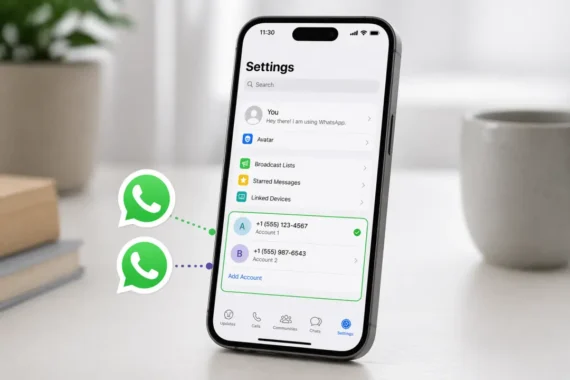
Yes, in 2026, it became much easier to use two WhatsApp accounts on one iPhone. WhatsApp has officially started rolling out a multi-account feature that lets you add and switch between two accounts directly within the same app.
Earlier, users had to rely on workarounds like WhatsApp Business, but now it’s much more seamless.
How to use two WhatsApp accounts on one iPhone without installing extra apps?
If you’re wondering how to use two WhatsApp accounts on one iPhone, the easiest way now is through the built-in “Add Account” option inside WhatsApp settings (if available on your version).
If you don’t see it yet, you can still use WhatsApp + WhatsApp Business as a reliable alternative.
Do I need two phone numbers to use two WhatsApp accounts on one iPhone?
Yes, you’ll need two active phone numbers (SIM or eSIM). Each WhatsApp account is linked to a unique number, so you cannot run two accounts with the same number.
This is the most common requirement people overlook.
Is it safe to use third-party apps for dual WhatsApp on iPhone?
Not really. While some apps claim to help you with how to use two WhatsApp accounts on one iPhone, they usually rely on WhatsApp Web and can be unreliable or risky.
Experts recommend sticking with official methods like the native feature or WhatsApp Business for better security and stability.
What is the easiest method for beginners to use two WhatsApp accounts on one iPhone?
For beginners, the simplest method is:
- Use the official multi-account feature (if available on your iPhone), OR
- Install WhatsApp Business for the second number
Both options are beginner-friendly and don’t require any technical setup, making it easy to understand how to use two WhatsApp accounts on one iPhone quickly.
Recommended Reading
- How to Check Battery Health on Android 16 Without Apps (Easy & Accurate Method)
- Are CAPTCHAs training AI in 2026? The truth behind its training of AI robots while you solve them
- Fast Charging Secrets! Fast charging only works until 80 percent and here is why
For a deeper dive into the technical specs, Wired has a great breakdown on the hardware side of things.