

You’re replying to a message when a delivery alert pops up. You swipe it away, then realise you didn’t read it. If you’d already turned on Android notification history, the alert may still be there. If history was off, check the app that sent the alert. Turning it on now will help next time, but it won’t bring this alert back.
Where to find Android notification history
The setting is built into supported phones, so you don’t need a separate app. The menu looks a little different depending on which phone you have.
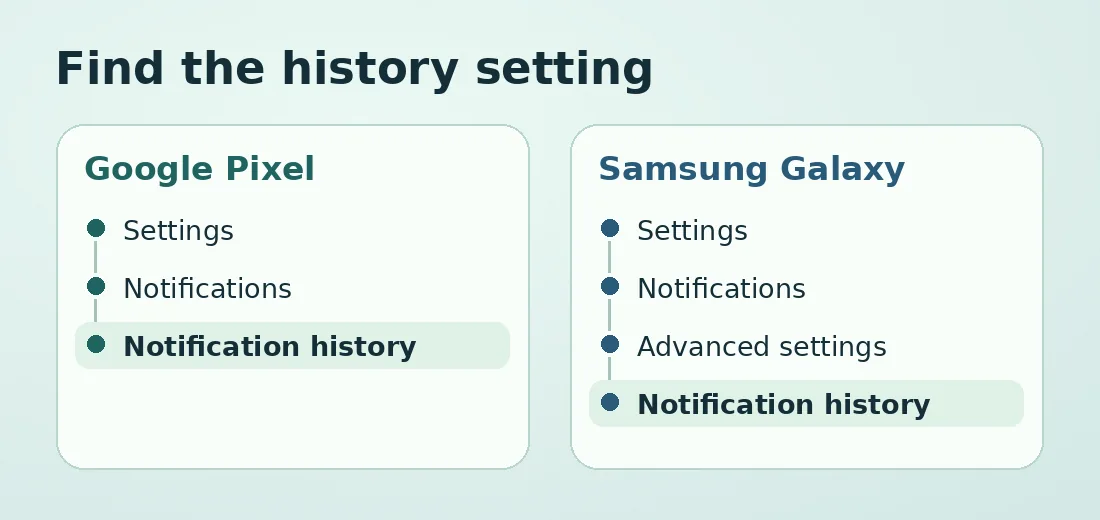
On a Google Pixel, open Settings → Notifications → Notification history. If Use notification history was already on, look through the recent entries. Google says Pixel keeps a list of notifications you dismissed in the last 24 hours. You can also pull down the notification panel and tap History at the bottom when that shortcut is visible. If it isn’t there, use Settings.
On a Samsung Galaxy, open Settings → Notifications → Advanced settings → Notification history. The extra Advanced settings step is easy to miss. If the switch at the top is already on, look below it for your recent alerts. If it’s off, enabling it will start the list for future alerts.
On a Motorola phone that supports the feature, start at Settings → Notifications → Notification history. Motorola documents this path for the Edge 60 Pro. On another Android phone, search for “notification history” in Settings. If you cannot find it there or in your model’s manual, it may not be available on your version of the phone. Android makes this screen optional for phone manufacturers, so a missing menu doesn’t mean your phone is broken.
What to do if the alert isn’t there
First, work out whether you need the wording of the alert or the information behind it. If you only want to know whether your parcel is arriving today, there is no need to recover the original banner. Open the shopping or courier app and check the order. Likewise, the Phone app’s Recents list is usually a better place to check a missed call than scrolling through a long list of alerts.
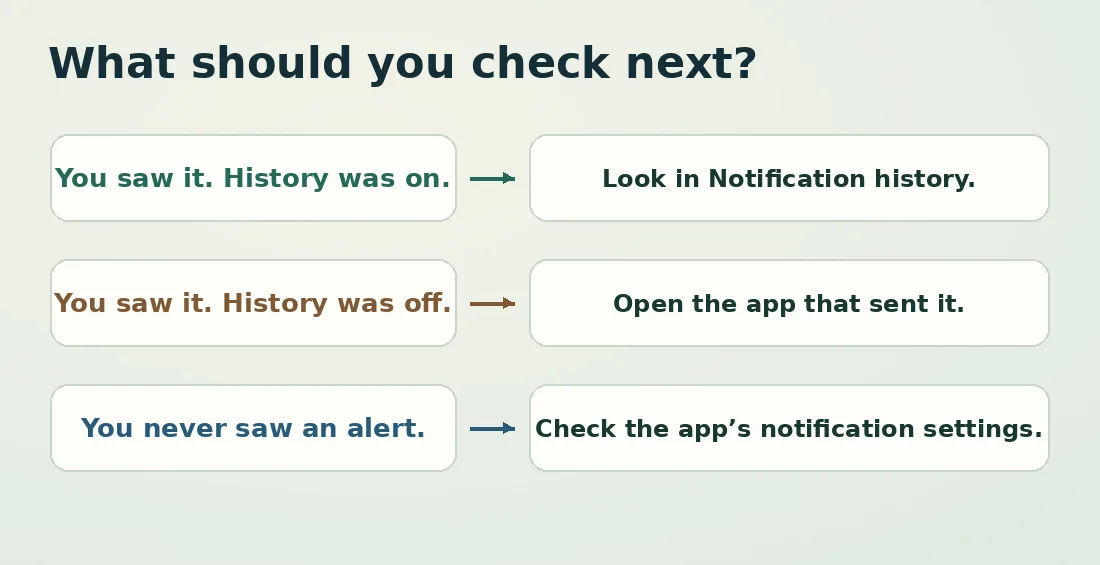
If history was on, check the app name and look around the time you remember seeing the alert. On Pixel, tapping an entry can open the app that sent it. It may not take you back to the exact screen, particularly if the item has changed or the app only sent a short preview. If the entry says you have a new message but does not show its contents, open the conversation instead of expecting the log to contain the full message.
If Android notification history was off or the alert is too old to appear there, check the app that sent it. Try your inbox for an email, the order page for a delivery update, or the account activity page for a sign-in warning. For a payment or security alert, open the official app directly and check the activity there. An old notification is a clue, not proof that the account or order is still in the same state. If it was a sign-in alert from Google, see our guide to securing your Gmail account for ways to protect it.
If you never saw an alert in the first place, that’s a different problem. Android notification history won’t show a notification that the app never posted. Open Settings → Notifications, find the app, and check whether it is allowed to send notifications. On some phones, an app can have separate categories for orders, reminders and promotions. Make sure the one you actually need isn’t turned off. Don’t change every category just to check one missing alert.
Try it once before you depend on it
Switch history on, set a harmless reminder for a minute from now in an app that already shows notifications, and wait until its alert appears. Swipe only that alert away. Open Android notification history and look for the app name and reminder. This tells you whether the feature is working on your phone and gives you a chance to find the menu when you’re not looking for something urgent.
If the reminder never appeared, check the reminder app first. If it appeared but the history is blank, make sure the switch was already on before the reminder arrived and repeat with a fresh alert. Don’t toggle history off just to see what happens while you still need an old entry. Google’s Android reference describes deleting the saved entries when history is turned off. In Google’s reference version of Android, entries are kept for 24 hours by default, but phone makers can change that. A notification you need later belongs in the app’s own records or wherever you normally keep important information, not in this short list.
Is it worth leaving on?
If you often clear alerts by mistake, Android notification history is a handy backup for the day. If you share your unlocked phone, remember that it can also keep short pieces of notification text visible after the alert leaves the panel. Leave history off if that trade-off doesn’t suit you. A third-party logger is not a shortcut for getting back an alert that was never recorded. An app that asks for notification access may be able to read future alerts, so don’t grant that access just to look for one old message.
Hiding previews on the lock screen isn’t the same as switching off Android notification history. The first changes what someone can see before unlocking your phone; the second controls whether the phone keeps this short list. Check both if you regularly hand your phone to someone else.
Frequently Asked Questions
Can I see a dismissed notification if history was off?
Not in Android’s built-in history. It doesn’t fill in alerts from before you enabled it. Check the original app, such as your email inbox, call log or order history.
Does tapping Clear all erase notification history?

Clear all removes alerts from the notification panel. On supported phones with history enabled, those recent dismissed alerts can still be in history. Turning the history setting off is different from clearing the panel.
How long does Android notification history keep old alerts?
Google documents a 24-hour window for dismissed notifications on Pixel. That’s also the default in the Android reference implementation, but the phone maker can change it. Don’t count on finding alerts from several days ago.
Why is there no Notification history option under Notifications?
On Galaxy, check Advanced settings first. On other phones, try the Settings search box and your model’s manual. Some Android software doesn’t include the feature.
Can Android notification history restore a deleted WhatsApp message?
It can’t restore a chat or message. You might find a short preview if the app posted one and the phone recorded it. If nothing was recorded, history can’t recreate the message.
Do I need a notification history app?
No, not on a phone that includes the built-in feature. For one alert you already lost, check the original app rather than granting a new app access to future notifications.
Editorial Note: This guide is based on published technical documentation and was prepared with AI assistance. The illustrations are conceptual and do not represent actual device screenshots. Learn more about our Editorial Policy.